
AI coding tools and AI code generators can now produce code, tests, documentation, and implementation suggestions from natural-language instructions. But simply launching a model and writing a good prompt is not enough to deliver meaningful efficiency gains.
The greatest benefits come when AI becomes part of a well-designed process—one in which it receives a clearly defined task, the right context, appropriate tools, and clear quality criteria, and its output is verified before it is put to use.
In other words, instead of focusing only on what to ask AI, it is worth designing the entire way you work with the model.
Here is how to do it, step by step.
First, an important caveat: Make sure you’re allowed to use AI code generation
Before using AI in a project, make sure its use has been approved by the appropriate stakeholders. Depending on the situation, this may include the client, project sponsor, business owner, or your organization’s management.
Your use of AI should also comply with the security, data protection, and AI policies of both your own organization and the organization you are working for.
This is especially important if the model may be given access to customer data, non-public source code, internal documentation, financial information, infrastructure configurations, or other restricted materials.
If organizational policies specify which tools may be used, what data may be shared with them, or which activities require additional approval, those requirements should serve as the starting point for designing your entire AI workflow.
1. Start with the problem, not the tool
The first question should not be: “Which AI model is best?”
A better question is: Which part of our work is repetitive, time-consuming, or costly today—and produces an outcome we can verify afterward?
These are often the tasks that make the best candidates for AI assistance.
Examples include analyzing large volumes of material, preparing a first draft of documentation, generating test cases, transforming data, refactoring straightforward pieces of code, or developing several possible solution approaches.
But do not assume from the outset that AI will always be the best option. Sometimes a simple script, template, validation rule, or traditional automation will be cheaper, faster, and more predictable.
AI should be a tool for solving a problem—not a solution looking for one.
2. Start with a small part of the work
If you see an opportunity to use AI, do not hand over the entire process at once. This becomes even more important in multi-step workflows, where an AI agent or coding agent may perform several actions before returning a result. Choose a small, clearly defined part of the task where you can specify exactly what the expected outcome should be.
Instead of asking: “Analyze the system and come up with a solution to the problem”,
- break the work into a sequence of smaller steps:
- analyze the available materials,
- identify constraints,
- develop several options,
- assess the risks,
- create a specific part of the solution,
- and verify the result.
The smaller each individual step is, the easier it becomes to spot the point where the model made an incorrect assumption.
A useful rule of thumb is:
task → output → evaluation → correction → re-evaluation → next step
This approach may seem slower than asking AI to do everything at once. In practice, however, it often helps you avoid ending up with a large, impressive-looking result built on a mistake made at the very beginning.
Read more on custom software development
Legacy modernization with AI starts as archaeology
AI agent development is changing the economics of custom software
AI legacy code modernization: from untouchable systems to understandable software
Vibe coding: a fast track from idea to application, or a risky shortcut?
Generative AI in pharma: A virtual assistant for smart sales
8 generative AI trends to watch in 2025
Ten business use cases for generative AI virtual assistants
A web application security checklist for every stage of development
Time and material vs. fixed-price contracts: Is there a smarter alternative?
3. Give AI context, not just a prompt
One of the most common ways to limit what AI can do is to give it too little information.
A model may receive a very precisely worded instruction, but if it does not understand the business objective, solution architecture, project constraints, or team standards, it has to fill in the missing information on its own.
And every assumption it makes increases the risk of error.
So instead of focusing only on crafting the “perfect prompt,” make sure the AI understands:
- the goal of the task,
- what the expected output should be,
- who will use it,
- what constraints apply,
- which technologies and versions are being used,
- what standards apply to the project,
- what must not be changed,
- how to determine whether the result is correct.
When necessary—and permitted under your security policies—provide relevant source materials as well, such as code snippets, requirements, documentation, logs, examples of correct outputs, or architecture information.
For coding tasks, relevant context may span multiple files or large parts of a codebase. The goal is not to fill the model’s context window with the entire codebase, but to provide the codebase context that is actually relevant to the task.
Treat context quality as one of the main factors affecting the quality of AI output. A well-written prompt cannot compensate for missing business requirements, architectural constraints, project standards, or examples of acceptable results. The less the model has to infer, the more predictable its output becomes.
This is one of the most important shifts in how we work with AI: it is becoming less about finding the perfect prompt and more about managing context deliberately.
4. Tell AI what it must not do
Good context is not just about defining the expected outcome.
It is equally important to define the boundaries.
If the model is modifying code, specify which components it must not touch. If it is analyzing a document, define which sources it may use. If it is preparing a technical recommendation, make the architectural, cost, and security constraints clear.
It is also worth defining how much freedom the model should have.
AI may only be allowed to suggest a change. It may prepare code for review. It may run tests. In more advanced scenarios, it may be permitted to perform specific actions using tools.
When an AI coding assistant can access external tools through integrations such as the Model Context Protocol (MCP), access should be limited to the tools, data, and actions required for the task.
Greater autonomy requires stronger governance controls.
The higher the potential cost of an error, the more precisely the model’s boundaries should be defined.
5. Don’t ask for one answer. Ask for options
One of AI’s greatest strengths is its ability to explore multiple approaches quickly.
It is worth taking advantage of that.
Instead of asking the model to produce the “best solution” right away, ask it first to generate several possible options, along with their implications, limitations, and risks.
This way, AI does not act as the decision-maker. Instead, it expands the range of options a person can consider.
For example, you might first ask for three possible solution architectures, then compare their implications, choose one of them, and only then ask the model to prepare a specific implementation.
This allows you to use the model’s speed where it delivers the most value: generating and analyzing alternatives.
6. AI proposes. Humans decide
AI can analyze materials, identify patterns, develop options, generate code, and speed up task execution.
But it does not take responsibility for the outcome.
People should still define the objective, provide the right context, set quality criteria, verify the most important facts, and decide whether the output should be used.
This principle is especially important when the result may affect production environments, security, data, finances, or users.
The level of oversight should depend on the level of risk.
This is not only a governance principle. AI-generated code can appear valid while still being semantically incorrect, failing to reflect the developer’s intent, or introducing security vulnerabilities. For critical or sensitive applications, generated code should therefore be reviewed and tested before it is accepted.
A draft of documentation can be reviewed relatively quickly. Code responsible for payments, infrastructure configuration, or data processing requires much more rigorous review, testing, and approval.
AI can help you reach a decision faster. It should not remove the person responsible for making that decision from the process.
7. Design the review process before you use AI
If you want to scale your use of AI effectively, you need to be able to review its work quickly.
That is why, before the task begins, it is worth asking:
How will we verify that the result is correct?
Depending on the type of work, this may involve automated tests, compilation, data validation, schema checks, linting, requirements verification, expert review, or comparison with source materials.
In software development, AI-generated code should be treated the same way as code from any other source.
It should be understandable, aligned with project standards, and properly tested.
The fact that code compiles does not necessarily mean that it solves the problem correctly.
8. Automate not only AI’s work, but also its verification
The greatest value comes when the model not only performs part of a task, but its output is also passed directly into an automated verification process.
For example, AI can generate a piece of code and then automatically trigger tests. It can transform data that is subsequently validated against a defined schema. It can prepare a document whose completeness is checked against a specific set of criteria.
This creates a shorter feedback loop.
This verification loop can also be built into the pull request process. AI-assisted code review can run before human review, while automated tests, linters, static analysis, and security scanning provide additional checks before a change is merged. The goal is not to replace human review, but to move predictable checks earlier in the process so reviewers can spend more time on architecture, business logic, and design trade-offs.
The model produces an output, the system checks it, any errors are fed back as additional context, and the next iteration can address them.
The more objectively an output can be evaluated, the more of the process can be automated safely.
9. Protect data and limit permissions
Just because you can give AI a large amount of context does not mean you always should.
The model should receive only the information it actually needs to complete the task—and only when using that data complies with applicable policies.
Before using a tool, you should understand what data is being sent to it, where that data may be processed or stored, who may have access to it, and what rules govern its further use.
Proprietary code, API data, customer information, and other restricted materials should only be made available to an AI tool when organizational policies explicitly allow it. In regulated industries, additional compliance requirements and governance controls may apply.
If the full set of materials is not necessary, reduce the scope of the data you provide. Where appropriate, use anonymization, sample data, or selected excerpts instead.
The same principle applies to tool access.
An agent that only needs to read a few files does not need permission to modify the entire repository. A tool that analyzes tickets does not automatically need the ability to close them. AI that prepares a configuration proposal does not need to deploy it on its own.
Minimizing permissions limits the potential impact of an error.
For security-specific guidance, teams can also refer to resources from the OWASP GenAI Security Project when designing safeguards for generative and agentic AI systems.
10. Use AI where expertise gives you an edge
It is easy to assume that if AI can quickly produce code, analysis, or documentation, the need for expert knowledge decreases.
In practice, the opposite is true.
The faster the first version of a solution is produced, the more important the ability to evaluate it becomes.
An expert needs to recognize when a solution looks correct but overlooks an important constraint. They should be able to spot unnecessary complexity, maintainability issues, security risks, or an approach that does not fit the specific project.
AI therefore shifts the focus of the work.
Less time may be needed to create the first version. More attention can then be devoted to defining the problem well, evaluating options, testing, integration, and decision-making.
That is why AI delivers the greatest value to people who know how to assess the quality of what it produces.
11. Measure the impact of the entire process, not generation speed
Generating a hundred lines of code in a matter of seconds does not necessarily mean the work was completed faster.
If you then have to spend a significant amount of time reviewing, correcting, and testing the output, the apparent time savings may disappear.
That is why, when assessing the value of AI, you should look at the total cost of completing the task.
Take into account the time spent preparing context, working with the model, going through multiple iterations, reviewing the output, making corrections, testing, integrating the result, and maintaining it later.
What matters is not how much content or code the model generates, but whether AI makes the overall process faster, less expensive, or higher quality without increasing risk beyond an acceptable level.
For reusable solutions, it is also worth separating the initial cost of building them from the cost of using them again.
Creating an automation may initially require more effort than completing the task manually. But if you go on to use it dozens of times, the economics can look very different.
12. Turn what works into a repeatable process
Organizations get the most value from AI when successful experiments do not remain one person’s private way of working.
If a particular use case works consistently, it is worth documenting, standardizing, and making it available to others.
This could take the form of a template, workflow, script, agent, skill, set of instructions, or ready-made automation.
It is also worth documenting what did not work.
Knowing that a particular model performs well on one type of task but requires extensive corrections on another can be just as valuable as documenting a successful implementation.
This is how an organization moves from individuals using AI in an ad hoc way to building shared capabilities around it.
From a single prompt to a system of work
You will not get the greatest value from AI through one exceptionally clever prompt.
You will get it by building a process in which every use of AI is clearly defined, receives the right context, operates within established boundaries, and produces an output that can be verified.
AI can analyze information faster, generate more alternatives, and complete parts of the work in much less time. But people remain responsible for defining the problem, evaluating the output, and deciding whether and how it should be used.
The most effective model for working with AI can therefore be reduced to a few key elements—see Figure 1 below:
Fig. 1 The most effective model for working with AI
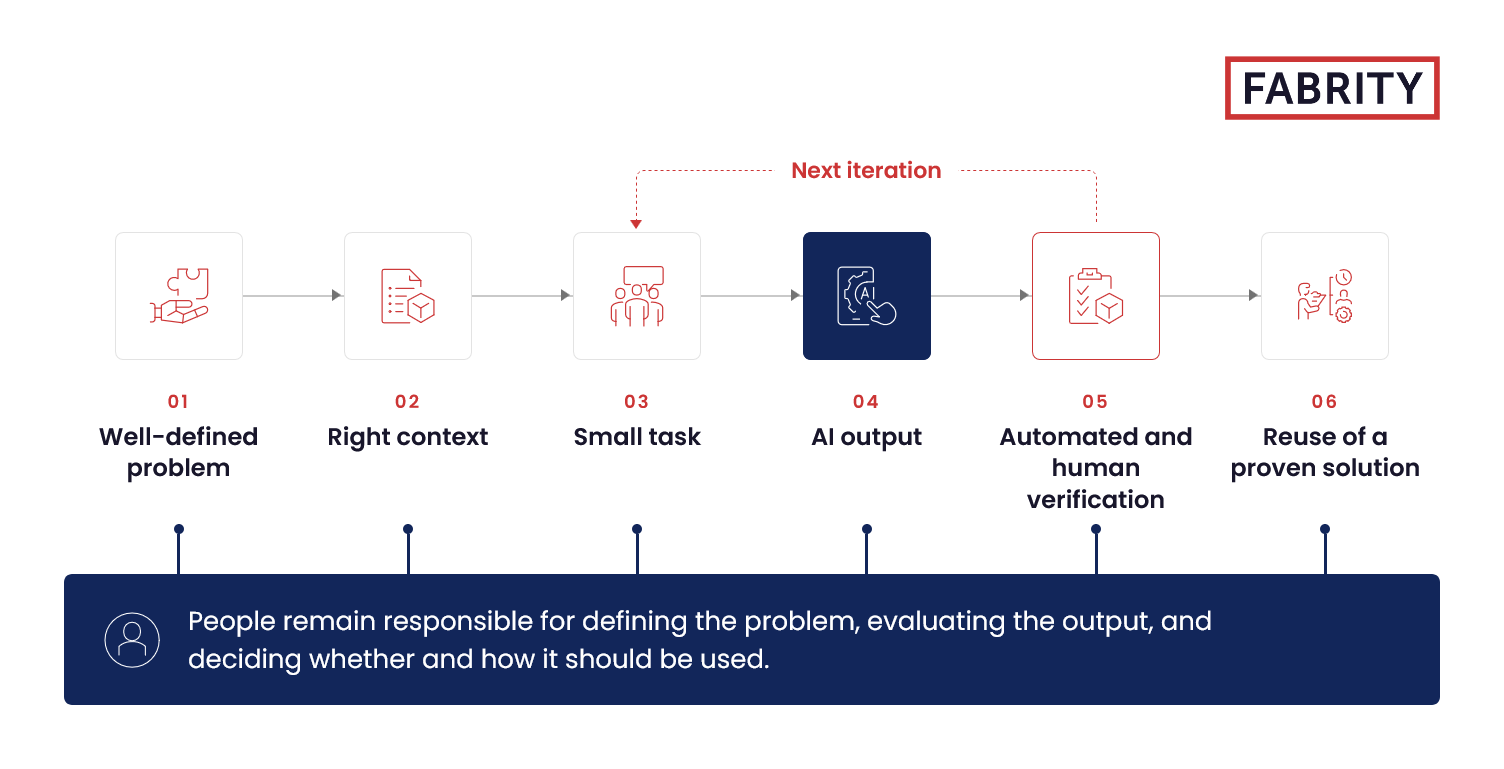

This shift—from isolated prompts to a deliberately designed process—is what allows organizations to get more value from AI without losing control over quality, security, and accountability.