
Requirements are documented in Jira or Redmine. Additional decisions are buried in a meeting transcript. The UI design lives in Figma, and the code is stored in a repository. Before a developer can make a change, they need to bring all that information together. An AI agent can help assemble the context, but it needs access to the tools and data the team works with.
That’s where MCP (Model Context Protocol) comes in. Introduced by Anthropic in November 2024, MCP is an open protocol for communication between large language models (LLMs) and external tools, services, and data sources. If we think of an AI model as the brain, MCP servers serve as its eyes, ears, and hands. They allow it to read documents, logs, and database records, but also update data, create tickets, and trigger workflows.
MCP does not replace APIs. An MCP server typically exposes an existing API, database, file system, or command-line interface (CLI) through a standardized interface designed for use by a language model. Its greatest value, however, doesn’t come from connecting a single tool. It comes from securely linking the stages of the software development lifecycle, from requirements and design through implementation and testing. The agent supports that process, while the team remains responsible for decisions.
How MCP works—and where its role ends
To understand MCP architecture and where it fits into the workflow, it helps to distinguish a few key components. The user works in an AI application, such as an AI coding assistant or an AI-powered IDE. The application serves as the MCP host and includes an MCP client, which manages the connection to a specific MCP server and passes tool calls to it. The server exposes data or operations, while the language model analyzes the task, selects the appropriate tools, and prepares the arguments needed to use them.
MCP uses JSON-RPC 2.0 for communication between clients and servers. Depending on the deployment, messages can be exchanged locally through standard input and output (stdio) or remotely through Streamable HTTP.
The workflow follows a sequence: the user assigns a task, the model uses information about the available tools, and the application handles the tool calls. At the appropriate point, permissions are checked and, when required, approval is requested. The server performs the operation in the target system, and the result is returned to the model. That result can be used to generate a response or serve as the starting point for the next step.
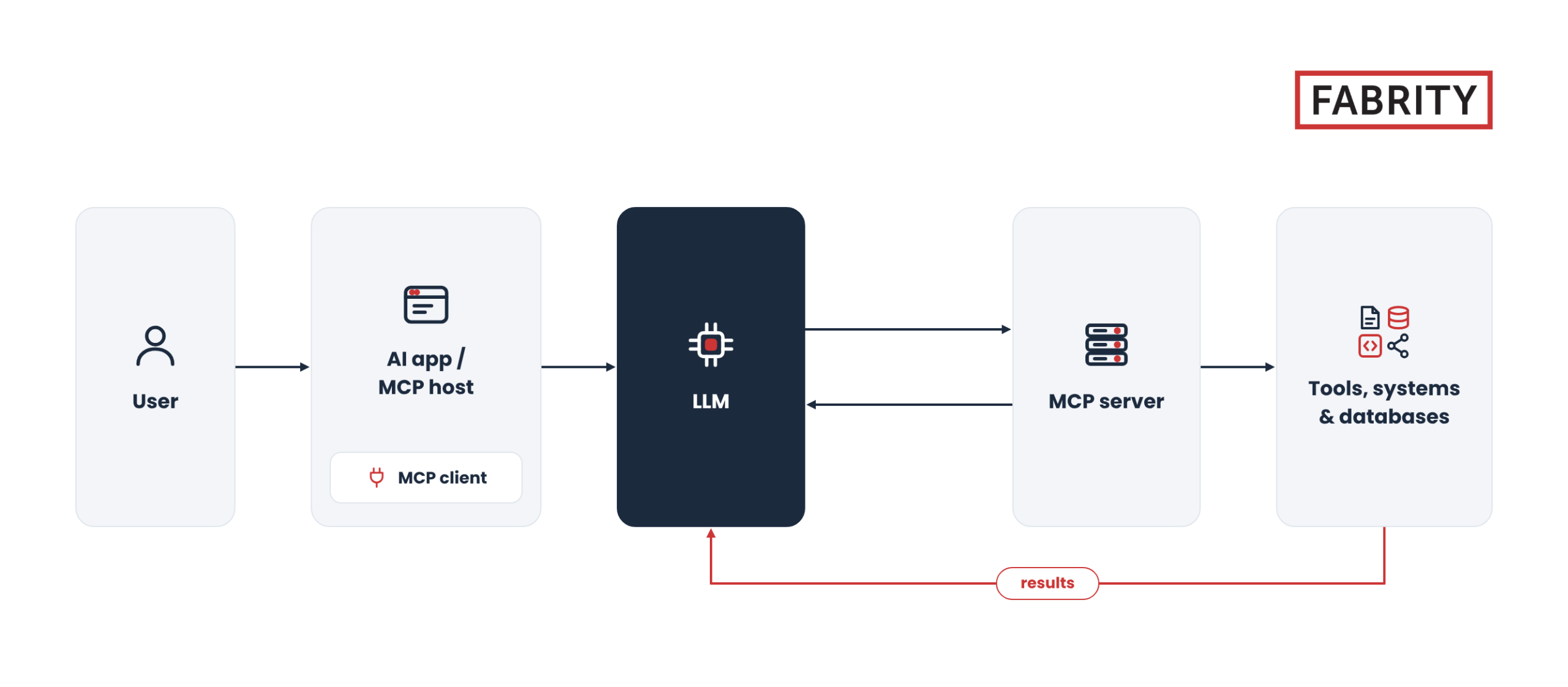

Fig. 1. How MCP works
This mechanism is not a substitute for workflow design. Simply giving an agent access to tickets, documentation, and repositories doesn’t establish the order in which those resources should be used, what constitutes sufficient information, or when human input is required. An agent can coordinate activities, but the organization still needs to define their scope, constraints, and completion criteria. That’s why the starting point should be the task to be accomplished, not a list of servers that could be connected.
From a requirement to a draft pull request
Let’s walk through an example of an application change that involves modifications to the UI, backend logic, and tests. Assume that the necessary information sources and operations are available through MCP servers, and that the agent receives access appropriate to each stage of the workflow. The goal is to prepare a validated change proposal for the team to review, not to bypass the people responsible for requirements, architecture, or quality.
Start with requirements and a shared understanding of the problem
The process begins with discussions and decisions involving the client and the team. The Product Manager consolidates the information, records it in project management systems, and passes it along for further analysis. Some details, however, remain in meeting materials. The analyst needs to bring these sources together, review earlier decisions, and translate them into a proposed solution scope, tasks, and acceptance criteria.
This is where an AI agent can help compare information across sources. It reads the ticket, searches the relevant materials, and checks whether the task description reflects what was agreed upon during discussions. It can identify a missing requirement, a contradiction between sources, or a question that needs to be resolved before implementation begins. The primary benefit is catching inconsistencies before they carry over into later stages of the workflow.
There’s an important distinction when it comes to responsibility. Identifying a contradiction doesn’t mean the agent should decide which version of a requirement takes precedence. Its role is to surface the issue and provide context to the person responsible for making that decision. At this stage, a useful outcome might be a clearly structured task description, a list of unresolved questions, or both.
Connecting design and architecture to requirements
The UI/UX designer works from the same context to create screens, components, and interface guidelines for digital products. Linking the Figma design to the task makes it possible to trace not only the finished screen but also the decisions behind it. The architect then evaluates the requirements and planned user flows against existing systems and technical constraints. This provides the basis for defining component responsibilities and how those components should communicate.
An agent can support both roles by comparing information across different sources. On the UI side, it can check designs against the existing design system and map visual elements to their corresponding code components. For technical analysis, it can help identify dependencies, assess the scope of a proposed change, and compare documentation with the actual implementation. It can also draft an architectural decision record or assist in reviewing an API contract.
The value of this approach lies in bringing together information that would otherwise have to be located separately. A question about how a change affects the UI can lead directly to the requirement, design, API contract, and relevant section of code. The team still evaluates the proposed solution, but it can do so with a more complete picture of the dependencies involved.
Implementation grounded in project context
The developer starts with the requirements, design, and technical approach. The agent reads the ticket and its comments, searches documentation and similar issues, and identifies the code that needs to change. Before making any modifications, it presents a plan for approval. Only after the plan is approved does it proceed with implementation and test preparation.
On the frontend, this means the agent can work with components and design rules from Figma and locate their counterparts in the repository. When a view communicates with the backend, through GraphQL, for example, the agent can read the available schema and check the implementation against the API contract. On the backend, the requirements, architectural approach, existing business logic, and documentation for the libraries in use remain the key points of reference.
The goal, then, is more than generating a snippet of code. The agent can find the right place in the codebase, reuse established patterns, execute controlled project tooling commands, and prepare changes in the repository. Its work should remain grounded in a specific task and the project’s conventions, rather than producing a solution disconnected from the existing implementation.
Testing, quality checks, and team review
Writing the code isn’t the end of the workflow. The next step is to verify that the change meets the acceptance criteria and passes the checks required by the project. The agent can prepare test cases, run unit and integration tests, and walk through a scenario in the browser. For UI changes, it can also compare the result with the design and collect information about browser console errors or network communication issues.
Quality and security checks provide another layer of validation. These include linting to identify potential code issues and check compliance with project standards, other forms of static analysis, and scans for exposed secrets and dependencies. The agent can organize the findings, highlight newly introduced problems, and distinguish them from existing technical debt. The outcome of this stage should include not only modified files but also the information the team needs to assess the scope and risk of the change.
The workflow ends with the creation of a draft pull request, a proposed change that is not yet ready for final approval, and a link added to the original ticket. The task remains open until the team validates the work. This keeps the requirement, implementation, and validation results connected, without allowing automation to replace the decision to accept the solution.
Broader capabilities require clearer boundaries
The same access to external systems that helps an AI agent gather context more efficiently can also introduce risks. A ticket, document, or log may contain more than the information needed for a task. It may also contain malicious instructions that the model mistakes for legitimate commands. This is known as prompt injection. A similar threat can come from tool descriptions or responses that attempt to persuade the model to disclose information or perform an unwanted action. Where MCP servers execute commands or handle credentials, poorly secured integrations can also expose systems to command injection or token theft.
How tools are combined matters, too. A read-only tool may provide information to another tool that can modify data or send it elsewhere. Evaluating each component in isolation is therefore not enough to assess the risk of the overall workflow. It’s also necessary to consider where retrieved information goes and what actions may be taken based on it.
Reducing these risks starts with the principle of least privilege and separating read access from write access. An agent investigating an issue should not automatically receive permission to perform every operation available in a system. Database access, for example, might be limited to specific views and predefined parameterized queries, with limits on the number of records returned and personal information masked.
Destructive or costly actions should require approval. Audit logs should capture the user, the arguments passed to a tool, the outcome of the operation, and the approval decision. Organizations also need the ability to enforce execution time limits, stop automation, and roll back changes. Content retrieved from external systems should be treated as data to analyze, not as trusted instructions that can override the agent’s operating rules.
For remote MCP deployments, HTTPS helps protect communication, while access tokens need to be stored securely and validated for their intended audience. Short-lived access tokens and refresh-token rotation can further limit the impact of compromised credentials.
Local MCP servers deserve particular attention. They are executable programs, which means their code, dependencies, and updates can pose risks to a user’s machine and sensitive information. Verifying a server’s origin and controlling its version are therefore important parts of a security assessment, alongside reviewing the scope of its access to target systems.
Design the workflow, not a catalog of integrations
When introducing MCP into enterprise generative AI workflows, it’s worth starting with a specific task: what information is required, which operations are permitted, and what a successful outcome looks like. Only then should the tools be selected. A proven procedure for preparing a code change, checking release readiness, or gathering information during an incident can serve as the foundation for automation. That procedure should still define the sequence of steps, the evidence required, and who must approve the results.
There’s no need to give an AI agent access to every available MCP server or integration at the beginning of a task. Access can be tailored to each stage of the workflow, and tools can be designed around specific actions rather than simply exposing an entire API. Authentication, data filtering, usage limits, and testing agent behavior are all important considerations. A large number of available tools isn’t necessarily an advantage, as it can consume the model’s context and make selecting the right tool more difficult.
Larger organizations also need clear policies for managing integrations. These should cover a catalog of approved MCP servers, designated business and technical owners, version control, and reviews of what data may be passed to the model. A test environment is needed before production deployment, along with the ability to disconnect a server quickly during operation. This ensures that responsibility for an integration doesn’t end when it first goes live.

When MCP makes sense—and when a simpler solution is enough
MCP is particularly useful when AI agents need to connect information and actions across multiple systems. In the scenario described here, the benefit comes from connecting discussions to requirements, design to code, and implementation to test results. A standardized interface can make integrations easier to reuse, but it also introduces an additional infrastructure layer and more dependencies. Instead of maintaining a separate integration for every combination of AI application and external system, teams can reuse MCP-compatible servers across different applications.
Not every workflow requires that extra layer. If a process is fully deterministic and can easily be expressed as a script, simpler automation may be the better choice. The same applies when minimal latency, strict predictability of every action, or restrictions on agent access to a particular system are critical requirements. In such cases, a direct API integration, job queue, or workflow engine may be sufficient.
The decision also needs to account for ongoing operations. Multi-step workflows introduce latency, and troubleshooting failures may require determining whether the problem originated in the model, MCP client, MCP server, or target service. Maintaining, monitoring, and evaluating the quality of integrations therefore add to the cost of completing a task. The ability to connect tools doesn’t automatically make an MCP-based solution worthwhile.
Measure value across the entire workflow
Evaluating an MCP implementation shouldn’t stop at confirming that a server is running and responding to requests. The more important question is whether the agent can complete the task correctly from beginning to end. Useful metrics include the percentage of successful tool calls, the number of retries and invalid arguments, task completion time, and the number of actions approved or rejected.
In our example, the question isn’t just, "Did the agent create a pull request?" It’s also, "Does the change meet the requirements? Which checks were performed? And does the team have the information it needs to review the work?" Only then does it make sense to compare the time required with the existing process and account for the costs of the model, infrastructure, and potential incidents.
MCP delivers its greatest value when it securely connects information and actions into a coherent workflow. Requirements remain linked to tasks, designs to implementation, and test results to specific changes in the repository. The agent helps gather context and handle repeatable work, while the team remains responsible for decisions. It’s this continuity, supported by access controls, validation results, and clearly defined approval checkpoints, that organizations should focus on building and measuring.